Finding trips in a camera roll with on-device CLIP
Your camera roll already knows where you’ve been. The timestamps and GPS tracks in a few years of photos describe every trip you’ve taken more accurately than you could from memory. Aermes has a feature that reads that record and builds your trips from it: grouped, mapped, junk removed, ready to edit.
The obvious way to build this is to upload everything and run models on a server. We didn’t, for three reasons. Nobody should have to upload their entire camera roll to a startup to get value from it. Per-photo GPU inference for a free feature is a bill that scales with adoption, which is the wrong direction. And a round trip through an upload queue makes a thing that should feel instant feel like a batch job. So the whole AI pass (embedding, junk detection, deduplication, placement, segmentation) runs on the phone, inside a React Native app. On an iPhone 13 it works through a little over four photos per second.
This post is about what that actually takes, with measurements.
The pipeline
One scan processes up to 800 photos from a rolling window (default: three months) and runs these stages in order:
- Scan. Page the photo library newest-first, 200 assets per page, pulling GPS and EXIF per asset. The time-window check runs before the expensive per-asset metadata call, so out-of-range photos cost almost nothing.
- Metadata classify. A deterministic pass with no model: drop screenshots (the OS labels most of them), drop anything under 200px, drop tall portrait images with an aspect ratio between 1.9 and 2.5 that are PNGs or have no location. That band is deliberate: iPhone screenshots are ~2.16 tall, panoramas are landscape, and real portraits are ~1.33, so it cleanly isolates screen captures that lie about being photos.
- Cache lookup. Every photo is embedded once, ever. Vectors are cached per asset ID, namespaced by model version. Only cache misses touch the model.
- CLIP embed. The actual inference. 224×224, CLIP mean/std, NCHW, one image at a time, output L2-normalized to 512 dimensions.
- Zero-shot scoring. NSFW and junk get dropped, travel-looking gets tagged. More on how below, because there’s no text encoder on the device.
- Near-duplicate dedupe. Burst shots and re-takes collapse when cosine similarity is at least 0.93 within a 180-second window.
- Placement. Photos without GPS inherit coordinates from photos that have it (three strategies, below).
- Trip segmentation. A new trip starts on a time gap of 2 days or more, or a geographic jump of 200 km or more, between consecutive photos. Trips with fewer than 3 photos don’t count.
- Travel filter. A trip is travel (not everyday life) if its centroid is at least 60 km from home, or at least 40% of its photos score travel-looking.
- Naming. “City · Month Year”, city from on-device reverse geocoding. No API call.
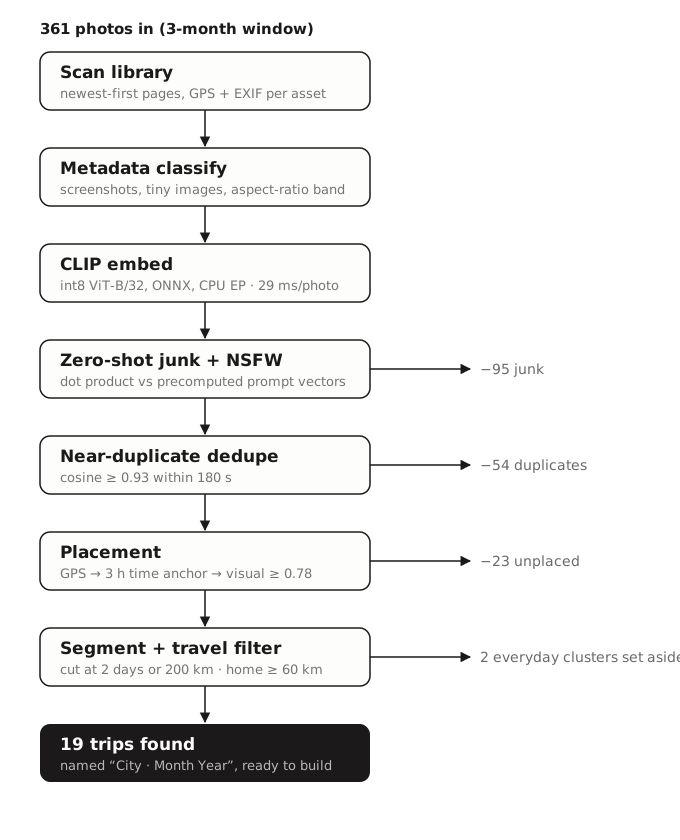
On a real library (mine, three months of it), one scan looks like: 361 media in, 95 dropped as junk, 54 collapsed as near-duplicates, 23 set aside as unplaceable, 2 clusters parked as everyday life, and 19 trips out the other end. The junk pile catches exactly what you’d hope: screenshots, a terminal window someone photographed, app screens, blurry pocket shots.
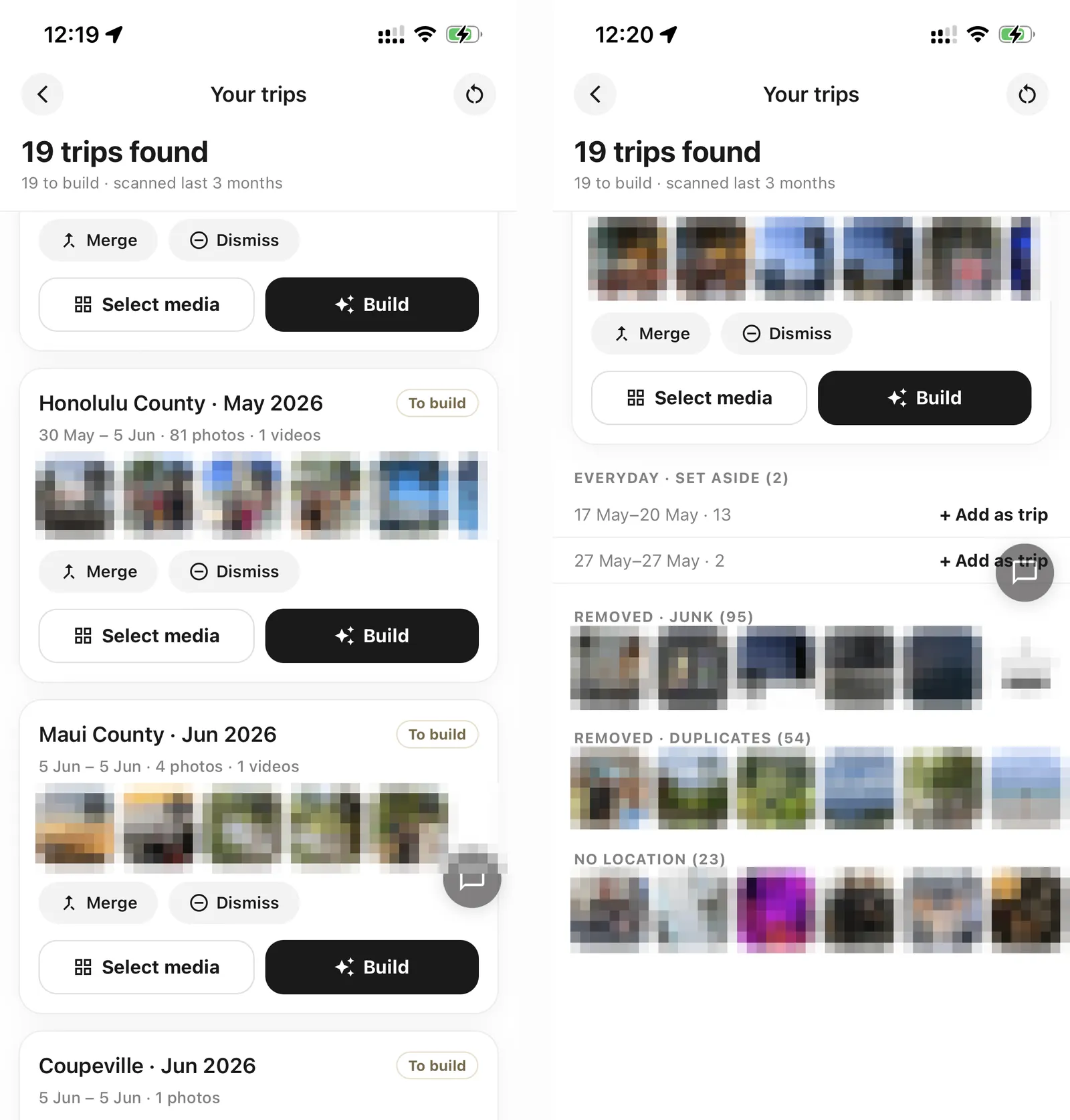
Because vectors are pre-normalized at embed time, every similarity comparison downstream (dedupe, placement, clustering) is a bare dot product. There is a line in our codebase that reads, in full:
export const cosine = dot;The license trap
We didn’t start with OpenAI’s CLIP. We started with Apple’s MobileCLIP, which is smaller, faster, and literally designed for this. We had it exported, quantized, and embedding photos on a real device before anyone read the license file closely: apple-amlr, non-commercial. Unusable in a product.
The replacement is the original OpenAI CLIP ViT-B/32, which is MIT-licensed. The conversion is unglamorous: load the checkpoint in transformers, trace only the image side (the vision tower plus the visual projection, so the output is the final 512-d embedding), export to ONNX, then onnxruntime.quantization.quantize_dynamic to int8. That takes the file from ~340 MB fp32 to 88 MB, and it runs under onnxruntime-react-native. We spot-checked that junk/travel classifications agree with the fp32 model on a sample library rather than formally measuring embedding drift; in the prompt matchups described below, int8 and fp32 pick the same winners. Which execution provider actually runs it turned out to be a story of its own, below.
The lesson costs one sentence to read here. In practice it cost us a re-export, a re-quantization, and regenerating every downstream artifact: check the license before you benchmark. A model that can’t ship doesn’t have performance characteristics worth measuring.
Zero-shot classification with no text encoder
CLIP’s party trick is that images and text live in the same embedding space, so you can classify images by comparing them to sentences. But the text encoder is a second model we’d have to ship, load, and run, for prompts that never change.
So we don’t ship it. The text prompts are embedded offline with the same openai/clip-vit-base-patch32 checkpoint, and the resulting unit vectors are committed as a plain JavaScript module: a 277 KB file that is mostly eighteen very long lines of floating-point numbers. On the device, “is this a screenshot?” is a dot product between an image vector and a hardcoded array.
The classification isn’t a threshold, it’s a race. A photo is junk if its best similarity to any junk prompt (“a screenshot”, “a receipt”, “a scanned document”, and so on) beats its best similarity to any real-photo prompt. Same structure for travel-vs-everyday (“a famous landmark” vs “a photo taken at home”) and for the NSFW gate, which is the only one with a safety margin on top.
This second pass exists because metadata can’t catch everything: a photographed document or a saved meme has normal photo dimensions and no screenshot subtype. Semantics catch what metadata misses.
One operational rule falls out of this design: the prompt vectors and the image encoder must come from the same model. Swap the encoder and the committed vectors are garbage that still parses. The embedding cache is versioned (clip-vitb32-v1) so a model swap invalidates it automatically. The prompt file has to be regenerated by hand, which is exactly the kind of thing that ends up in a checklist.
What it costs, measured
Numbers from a benchmark build of the production embed path: iPhone 13, iOS 26.5, the 100 most recent photos, cache bypassed, pacing sleeps removed. Two configurations of onnxruntime-react-native: the CoreML execution provider (what we shipped) and plain CPU.
| CoreML EP | CPU only | |
|---|---|---|
| Session create (cold / warm) | 3.2 s / 3.1 s | 0.21 s / 0.14 s |
| Preprocess per photo (avg / p95) | 200 ms / 290 ms | 193 ms / 273 ms |
| Inference per photo (avg / p95) | 69 ms / 85 ms | 29 ms / 46 ms |
| Steady-state throughput | 216 photos/min | 259 photos/min |
The fancy execution provider lost. We shipped the CoreML EP on the assumption that Apple-silicon acceleration beats CPU. Measured, it’s the other way around: plain CPU runs this int8-quantized graph 2.4x faster per inference and creates its session about 20x faster. We’ve since shipped plain CPU as the default. We only found this because this post needed a table. Benchmark before you trust an acceleration path.
Update (Jul 29): we dumped the partition map, and the mechanism is exactly what a reader suggested. When this post first went up we could only say “the likely story is that the quantized ops aren’t CoreML-supported.” A commenter on r/iOSProgramming pointed at graph partitioning, so we re-created the session with ONNX Runtime’s verbose logging (logSeverityLevel: 0) and read the partitioner’s receipts:
[GetCapability]  number of partitions supported by CoreML: 76
                 number of nodes in the graph: 969
                 number of nodes supported by CoreML: 627
[Node placements]
  Node(s) placed on [CoreMLExecutionProvider]. Number of nodes: 76
  Node(s) placed on [CPUExecutionProvider].    Number of nodes: 342
The graph has 969 nodes, and its entire compute core is quantized: 146 MatMulInteger and 100 DynamicQuantizeLinear nodes, which is every attention and MLP weight multiply in the ViT. The CoreML EP supports none of them, so all of the actual math stays on the CPU no matter what. CoreML still claims 627 of the surrounding fp32 nodes, but fragmented into 76 separate partitions, tiny islands averaging eight nodes each, which become 76 fused subgraphs in the final plan. Every inference therefore crosses the CPU-to-CoreML boundary dozens of times, paying data marshaling each way, to accelerate glue while the heavy ops never left the CPU. That is the whole 2.4x, mechanically. It also explains the 3.1 s session create: 76 little CoreML models get compiled. Fragmentation, not slowness, is why “65% of nodes supported” can still be a net loss.
The model is not the bottleneck. The photo library is. At steady state, resizing and decoding a photo costs about 195 ms while inference costs 29 ms. The very first pass over a library is worse: first-touch access to each photo averaged 1.7 s (p95: 4.9 s) while iOS materialized originals, iCloud fetches included, then settled to ~195 ms once local. Optimizing this pipeline means optimizing image loading, not the neural net. And we are leaving obvious wins on the table there: the resize currently starts from the full-resolution original instead of asking the photo library for a small target, and the resized pixels take a base64 round trip through a JavaScript-side JPEG decode before they become a tensor. Both have straightforward native fixes, and at 195 ms versus 29 ms they matter roughly six times more than any inference optimization would. It also means the first scan looks frozen if you let it: the session spin-up plus the slowest first photos stack at the start, so model loading emits its own status and the UI says “Preparing…” instead of a progress bar stuck at 0/800 that looks exactly like a hang.
Making it survive an actual phone
Everything above works in a demo. The following is what it took to work in a product.
We sleep 15 ms between every single inference. The scan keeps running while you use the rest of the app, because the scan state lives above the root navigator and navigation doesn’t kill it. Run inference flat-out and two things happen: the JS event loop starves and touches lag, and the phone heats up until the OS throttles it, which then slows the image compression and upload work that comes after. The cooldown costs about 12 seconds on a full 800-photo scan. Since embeddings are cached forever, that price is paid roughly once per photo per lifetime.
The 88 MB model isn’t in the app binary. It’s downloaded once over HTTPS on first use and cached. Download corruption is caught by an exact byte-size check (88,644,268). That is a corruption check, not an authenticity mechanism: authenticity is TLS to our own bucket, and the file’s sha256 exists for identity off-device. Hashing 88 MB on the JS thread takes seconds, which is why the size check won; verifying the hash on the native side instead is the obvious upgrade, and it’s on the list.
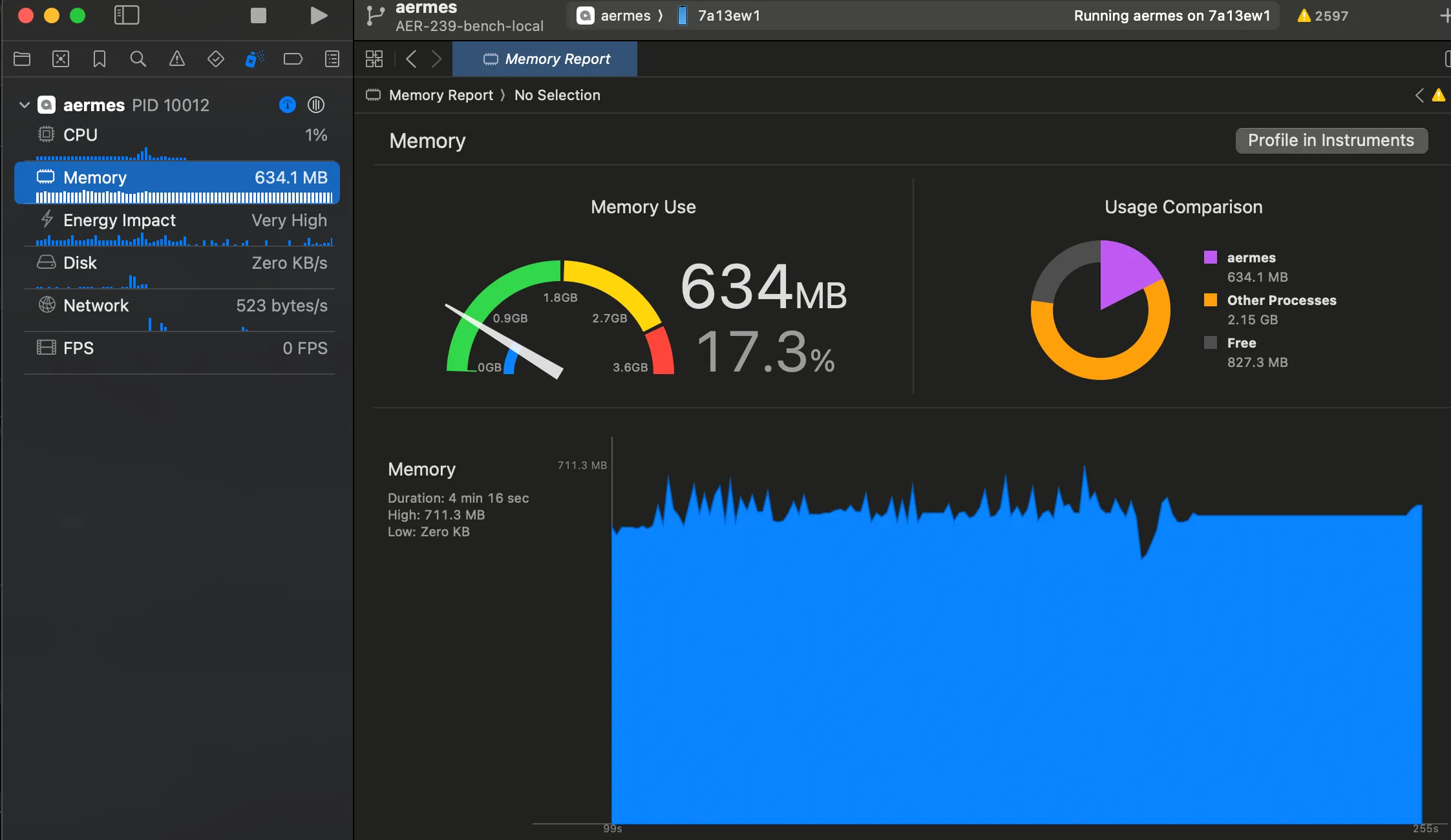
The model is deleted from memory after every scan. We learned this one from Instruments: after an early scan of just 68 photos, the app held 994 MB resident, forever. The ONNX session was a module-level singleton, which meant the 88 MB model plus onnxruntime’s inference arena stayed pinned for the life of the app, for a model that is only needed during the embed stage. The fix is boring and effective: release the session in a finally after the scan, re-create it lazily if a future scan has cache misses. The trade is re-creating the session on the next scan that needs the model (about 0.2 s on the CPU provider), and the embed-once cache makes even that rare. Most re-scans never touch the model at all.
Measured after the fix, from a clean install on the same phone, the deltas are the story (absolute numbers are a development build with the dev runtime attached, so they idle high): baseline ~485 MB, peaking at 711 MB while embedding (+226 MB), settling at 634 MB on the results screen with the model unloaded. The lasting cost of a scan is now review-screen thumbnails, not a pinned inference engine.
One bad photo never kills the scan. Every per-image failure is swallowed and skipped. A corrupt HEIC in photo 312 of 800 is not a reason to lose the other 799.
Placing photos that don’t know where they were taken
A large fraction of any real camera roll has no GPS (a separate post’s worth of findings). The pipeline handles it in three tiers, best to worst:
- GPS present. Use it.
- Time anchor. No GPS, but a geotagged photo exists within 3 hours: inherit its coordinates, marked as inferred.
- Visual placement. No anchor either: find the most visually similar geotagged photo in the scan, and above 0.78 cosine, inherit its coordinates. Your third no-GPS shot of the same cathedral lands where the cathedral is.
There’s a fourth trick for a specific pathology: photos saved from WhatsApp or AirDrop have their EXIF stripped, so they carry no GPS and the wrong date (the save date, not the capture date). If a near-identical twin exists in the library, at 0.93 cosine or above, the stripped copy borrows both coordinates and the real capture date from it.
Whatever is still unplaced after all that is excluded from trips rather than guessed at.
Prior art
The closest thing to this is Queryable, which runs full CLIP (both towers) on iPhone for natural-language photo search, and deserves credit for proving on-device CLIP practical at all. Ours is a different shape of problem: search wants a text encoder at query time; organizing a library into trips wants no text on device at all, plus everything CLIP can’t do alone, which is the placement, deduplication, and segmentation machinery above.
Questions you’d reasonably ask
Does it work when originals are offloaded to iCloud? Yes. iOS materializes them on first access; that’s exactly the 1.7 s average first-touch cost in the table, and it’s paid once per photo per lifetime thanks to the embed cache.
What does it do to the battery? The 15 ms per-inference cooldown exists precisely so the phone doesn’t cook. Scans are foreground-only today, so nothing runs while the phone is in your pocket.
What about Android? Same pipeline, same model, NNAPI-first EP config. We haven’t benchmarked it with the same rigor yet; given the iOS result, the honest expectation is that plain CPU wins there too.
Why not just use Apple’s Memories? Apple groups photos; it doesn’t produce something you can edit, map, and share as a travel story, and it doesn’t exist on Android. The scan output here is the input to a product, not the product.
What’s still open
Honest limits, because every pipeline has them. iOS suspends JS-driven work shortly after backgrounding, so a full-library scan currently wants the app foregrounded; moving the embed loop to a background processing task is planned, and the cache means interrupted scans resume cheaply. The junk/travel margins are set at zero and untuned. The vector cache is a single JSON file, which is fine at hundreds of photos and will want SQLite at tens of thousands. And the no-GPS problem is bigger than the placement tricks above. That’s the next post.
The feature ships in Aermes today. If you’ve shipped ONNX models inside React Native, or fought CoreML compile times, we’d genuinely like to compare notes.